¶ Paying a Vendor Outside Stampli — A Guide for AP
Purchasing › Vendor Management › For AP (Accounts Payable)
Most vendor bills get paid through Stampli. This page is for the ones that don't — the payments you handle another way (wire, ACH, manual check). It walks your side of the flow from the moment a payment is cleared to pay all the way to closing it out in NetSuite.
¶ The 30-second version
- Purchasing finishes their approvals and sets the payment's Payment Status to AP to Pay — that's your cue. You get pinged with an assigned comment right on the payment card.
- You open the card, read the details, and enter the payment in the bank.
- You let the bank approvers know it's entered so they can approve it in the bank.
- Once it clears, you close out the bill in NetSuite and set Payment Status to Paid Outside of Stampli. Done.
You work one payment at a time, on its own card. A single vendor can have several payments in flight at once — a deposit and a final on different projects, say — and each one is its own subtask with its own status.
¶ Where your work lives
Purchasing space → Vendor Management folder → Approved Vendor List (AVL).
Each payment is a Payment card that lives as a subtask under its vendor's card in the AVL. Grouping payments under the vendor is what lets one vendor carry several bills at once without them getting tangled.
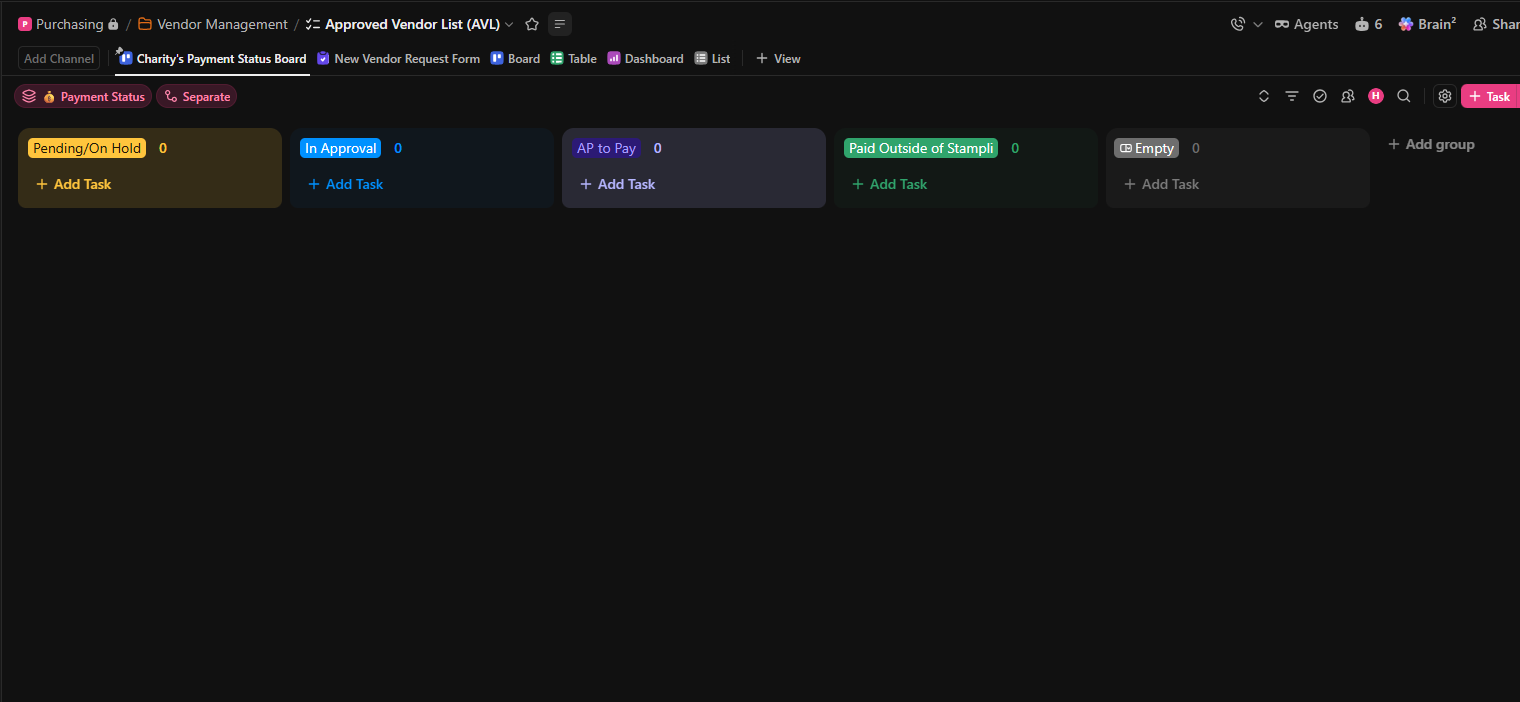
Your working view is the AVL board grouped by Payment Status (or filtered to AP to Pay), so your payments-to-pay collect in one column. You never have to hunt for them — see the next section.
📸 SCREENSHOT 1 — Your payment board (AVL grouped by Payment Status)
¶ How a payment reaches you
A payment moves through a few stages before it's yours:
- Pending/On Hold — the resting state when a payment is first created.
- In Approval — Purchasing is getting the payment approved.
- AP to Pay — approvals are done; it's ready to pay. This is your green light.
The moment a payment hits AP to Pay, an automation posts an assigned comment to you on that exact card — so you don't have to watch the board. The comment carries the key details (vendor, amount, pay-from, type) so you can act right from the notification.
If a payment is at AP to Pay, it's ready for you.
¶ Read the payment first
Before you enter anything in the bank, open the card and check these fields:
- Vendor — who's getting paid. Fills in automatically from the vendor card, so it's there even if Purchasing didn't retype it.
- Amount to Pay — the exact amount.
- Pay From — which entity's bank account the money comes out of (Holdings, Innolinks, or ReadyPod). This is which account pays — not the same as the vendor's Subsidiary, so read it carefully.
- Payment Type — Deposit, Progress Payment, or Final.
- Invoice or Prepayment — whether there's an invoice behind it, or it's a prepayment.
- Urgency — how quickly it needs to go out (Normal, High, Critical, or Low).
- Payment Notes — anything Purchasing flagged for you.
- PO — the PO this payment is against (for now, read from the payment name / the vendor card).
If something critical is missing or unclear, don't guess — see When something's not right below.
¶ Working the card — status by status
Move the card forward as the work actually happens. The status tells everyone — Purchasing included — exactly where a payment stands.
| Status | What it means / what you do | Advance when |
|---|---|---|
| Pending/On Hold | Just created, or parked waiting on info. Not ready for you yet. | Purchasing moves it forward. |
| In Approval | Purchasing is getting the payment approved. Not yours yet. | Approvals done → Purchasing sets it to AP to Pay. |
| AP to Pay | Yours. Enter the payment in the bank from the card details. | The payment is entered in the bank. |
| Paid Outside of Stampli | Terminal. Bill closed out in NetSuite; the payment is fully done. | — (end of the line) |
¶ Enter the payment, then hand to the bank approvers
- Enter the payment in the bank using the details on the card.
- Let the bank approvers know it's entered so they can approve it in the bank.
This hand-off is manual — the bank lives outside ClickUp, so there's no automatic ping here. Keep a note in the card comments that you've entered it and notified them, so the record stays complete.
¶ Close it out
Once the bank approval has cleared:
- Close out the bill in NetSuite.
- Set Payment Status to Paid Outside of Stampli.
That status is the signal that the payment is fully done — entered, approved, and reconciled in NetSuite. Don't set it until the NetSuite closeout is actually complete.
¶ When something's not right
If a payment is missing information, has the wrong amount, or something looks off, set it to Pending/On Hold and leave a comment saying exactly what you need. Purchasing is watching the card and will see it.
💡 Keep the back-and-forth in the card comments, not email or chat — it keeps the full record in one place, and it's the first thing anyone checks when a payment stalls.
¶ What not to do
- Don't pay from the wrong entity. Check Pay From, not Subsidiary — they can differ.
- Don't mark Paid Outside of Stampli early. That status means the bill is closed in NetSuite. Setting it before then tells everyone a payment is done when it isn't.
- Don't work payments from email or chat. The card is the record; if it's not on the card, it didn't happen.
¶ Status glossary
| Status | What it means for you |
|---|---|
| Pending/On Hold | Just created, or parked waiting on info. Not ready. |
| In Approval | Purchasing is getting it approved. Not yours yet. |
| AP to Pay | Yours — enter it in the bank. |
| Paid Outside of Stampli | Entered, approved, and closed out in NetSuite. Done. |
¶ Questions?
- A notification didn't fire, a status won't advance, or something looks broken → contact Haylee Whitney (haylee@boxhouse.com).
- A question about a specific payment, amount, or approval → Purchasing / Rachelle.
¶ Good to know (current state)
- The AP to Pay notification is automated. You get an assigned comment the moment a payment is ready to pay — you don't have to watch the board.
- New payments start at Pending/On Hold automatically. When Purchasing creates a payment card, it self-sets to the Payment type and a Pending/On Hold status, so nothing lands blank.
- The later steps are manual by design. Notifying the bank approvers and the NetSuite closeout happen outside ClickUp — the bank isn't a connected system.
- Notifications come as ClickUp assigned comments for now. Teams notifications are planned for later.
- Something looks off, or you want a tweak to your board? Reach out to Haylee — happy to help!