¶ Change Orders in ClickUp — Editing a PO that's already out
A complete guide to how a change order travels from ClickUp to NetSuite — how you flag what's changing, how it re-approves, and how the edit is written back onto the real Purchase Order, with every field and automation working behind the scenes.
¶ How it fits with Purchase Requests
The Purchase Requests → NetSuite flow creates a Purchase Order. This flow edits one that already exists.
That distinction matters: our old setup could create a PO but had no way to change one after the fact, so edits meant re-keying in two places. The Change Order flow closes that gap — it reaches into the live NetSuite PO and updates the exact line, with no manual re-entry.
The big idea: you say what's changing and approve it; the system checks whether the change is big enough to need re-approval, edits the real PO in NetSuite, and confirms — nothing is re-typed by hand.
Journey at a glance: New Request (associate the PO #) → System finds & links the PO → Purchasing Review (enter the new values, Submit for Approval) → tolerance check → small change applies directly / big change runs the approval matrix → Approved – Can Update PO → "Change PO in Netsuite" → NetSuite PO updated → Completed
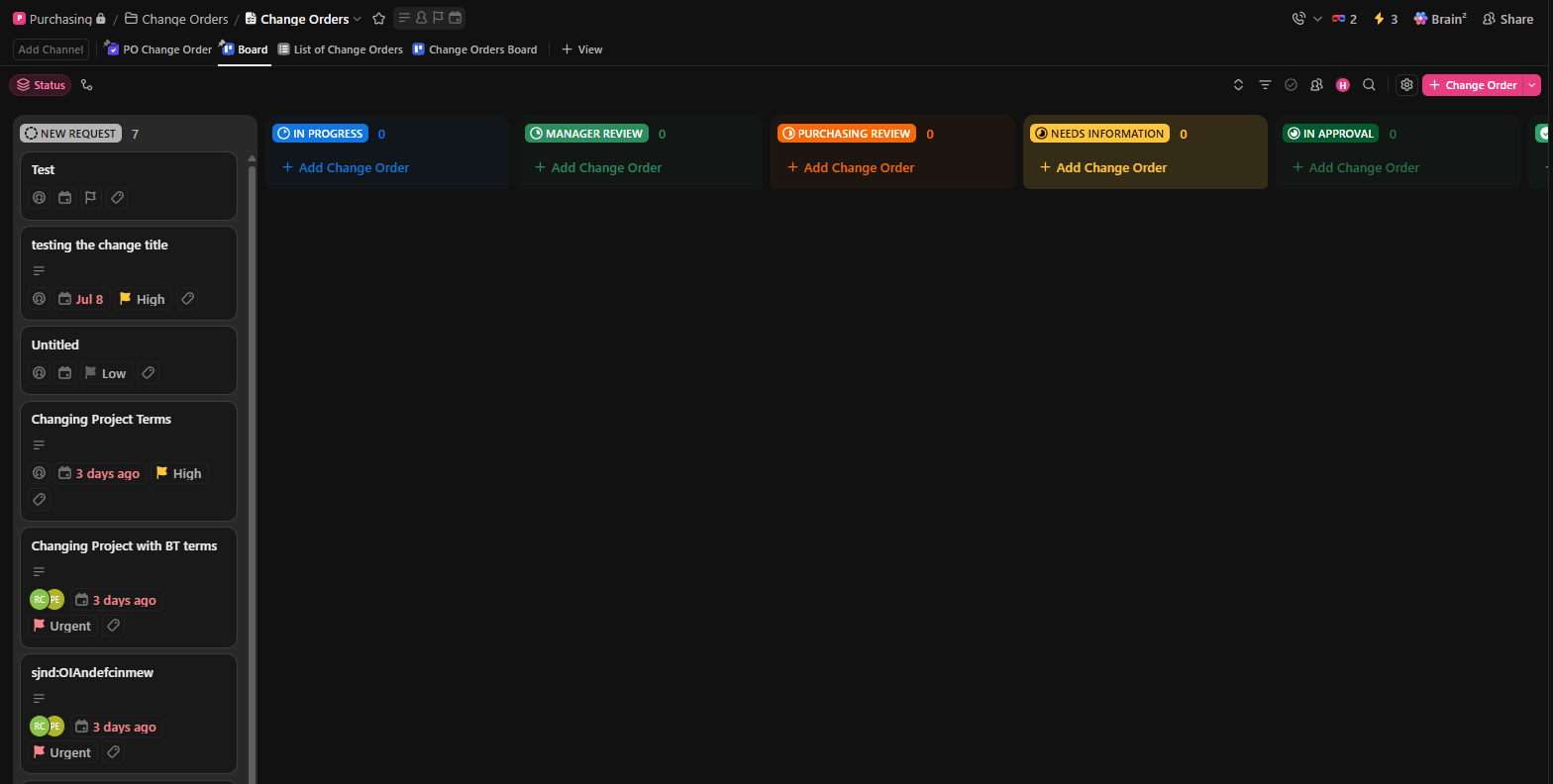
¶ 📸 SCREENSHOT 1 — The Change Orders board
¶ 1. Where it lives
Change orders live in the Purchasing space → Purchase Requests folder → Change Orders list.
Each change order links back to the Purchase Order it edits (the Related PO field), so you always have a clean trail from the original request to every change made against it.
¶ 2. Who does what
Two people bookend every change order, and the status tells you whose turn it is. Each stage also drops an assigned comment on the task, so the right person gets pinged automatically.
| Stage | Who | What they do |
|---|---|---|
| New Request | Payton | Reviews the request and enters the PO # — that one action kicks off the whole automation. Then enters the new values and moves it to Purchasing Review. |
| Purchasing Review | Rachelle | Verifies the values Payton entered, then sets Submit for Approval to route it. |
| In Approval Matrix | Approvers | Each approver sets their Decision (Approve / Reject / Needs Info). Only on big changes. |
| Needs Information | Rachelle + Payton | An approver needs more detail — fix it and Submit for Approval again. |
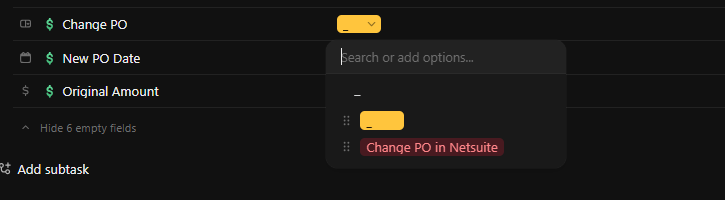
| Approved – Can Update PO | Rachelle | Sets Change PO → "Change PO in Netsuite" to write the change, then moves it to Completed. |
💡 Approvers never get picked by hand. Who approves is resolved automatically from the approval matrix — same as the PO itself — based on subsidiary, department, location, and the new amount.
¶ 3. What you can change
A change order can update these on an existing PO line:
| You can change | Notes |
|---|---|
| Price / Rate | New unit rate on the line (item lines) |
| Amount | New total on an expense line |
| Item | Swap to a different NetSuite item |
| Quantity | New quantity on an item line |
| GL / Account | Move the line to a different postable account |
| Effective / Transaction date | Updates the PO header date |
💡 Changing the vendor is not a change order. A different vendor means a different PO — start a new Purchase Request instead.
The flow works on one line per PO and uses absolute values — you enter what the line should be, not the difference. (That's what makes it safe to re-run; see Safe by design.)
Coming later: a free-text reason for change and multi-line PO edits are planned for a later phase — see What's next.
¶ 4. Field reference
¶ Fields you fill in
| Field | Type | What it's for |
|---|---|---|
| PO # | Text / Link | The Purchase Order you're changing — entering it starts the automation |
| Requestor | People | Who's requesting the change — used to find the right manager for approval |
| New Item | Dropdown (from NetSuite) | The item the line should become (item lines) |
| New Quantity | Number | The new quantity (item lines) |
| New Rate | Currency (USD) | The new unit rate (item lines) |
| New Amount | Currency (USD) | The new total (expense lines) |
| GL Code | Dropdown (from NetSuite) | Move the line to a different postable account |
| Effective Date | Date | New PO header date, if it's changing |
You only fill in the fields that are actually changing. The flow figures out whether it's an item line or an expense line from the live PO — you don't have to tell it.
¶ The controls
| Field | Type | Who sets it | What it's for |
|---|---|---|---|
| Submit for Approval | Dropdown | Purchasing | Routes the change through the tolerance check once the values are in |
| Decision | Dropdown: Approve · Reject · Needs Info | Approver | How the current approver responds |
| Change PO | Dropdown: "Change PO in Netsuite" | Purchasing | The control that writes the change to NetSuite |
¶ Fields the workflow manages
You don't touch these — the automations keep them accurate so you can see exactly where a change stands.
| Field | What it shows |
|---|---|
| Related PO | Links this change to the NetSuite PO it edits |
| NetSuite PO ID | The PO's internal id, recorded on lookup |
| Original Amount | The line's current value, read live from the PO |
| Subsidiary / Department / Location | Copied from the originating Purchase Request, used to route approval |
| Approver | Who's up right now |
| Current Step | Where we are in the chain |
| Approval Progress | The whole chain at a glance — ✅ done, ⏳ current, ⬜ waiting |
¶ 5. The automations
¶ A. Resolve & Relate — find and link the PO (when the PO # is set)
When a change order gets a PO #, an automation looks that PO up in NetSuite, records its internal id, and links the Related PO so the change is tied to the real order. It reads the line's current value into Original Amount (so we can tell later whether — and by how much — the dollar figure changed), and copies the Subsidiary, Department, and Location from the originating Purchase Request so approval can be routed correctly.
Result: the change order knows exactly which NetSuite PO — and which line — it's about to edit, and who should approve a change to it.
¶ B. Tolerance check — sign-off scaled to the size of the change (on Submit for Approval)
When Purchasing sets Submit for Approval, the flow measures the new value against the Original Amount stamped in step A.
- Within tolerance → no re-approval. If the new value stays within both ±10% and ±$10,000 of the original, it goes straight to Approved – Can Update PO for Purchasing to apply — no approval chain.
- Outside tolerance → full re-approval. If the change exceeds either threshold (up or down), it moves to In Approval Matrix and builds the approval chain, keyed on the new amount.
The smaller of the two limits is what binds. On a $50K PO, 10% (±$5K) is the tighter limit. On a $150K PO, the ±$10K cap is tighter than the ±$15K that 10% would allow — so ±$10K is the line.
¶ C. The approval matrix — chain sign-off (on a Decision)
For a big change, an automation builds the approval chain the same way a PO resolves its approvers: the requestor's manager first, then the dollar-band approvers from the maintained approval matrix (keyed on Subsidiary → Department → Location → new amount). The Approver, Current Step, and Approval Progress fields show exactly who's up and how far along it is.
Each Decision advances the change:
- Approve → moves to the next approver; the last approval lands it at Approved – Can Update PO.
- Reject → Rejected (a dead end — open a fresh change order if it still needs doing).
- Needs Info → Needs Information, back to Purchasing to add detail and Submit again.
¶ D. Commit — write the change to NetSuite (on "Change PO in Netsuite")
Once the change order is Approved – Can Update PO, Purchasing sets Change PO → "Change PO in Netsuite." That fires the workflow that:
- Guards first — confirms the change order is approved and has a linked PO before touching anything.
- Reads the live PO and auto-detects whether the line is an item or an expense line.
- Resolves the values — the item by its NetSuite name, the GL by its account number (the dropdowns mirror NetSuite exactly, so there's no crosswalk to maintain).
- Updates the line in NetSuite (and the header date, if an Effective Date was set).
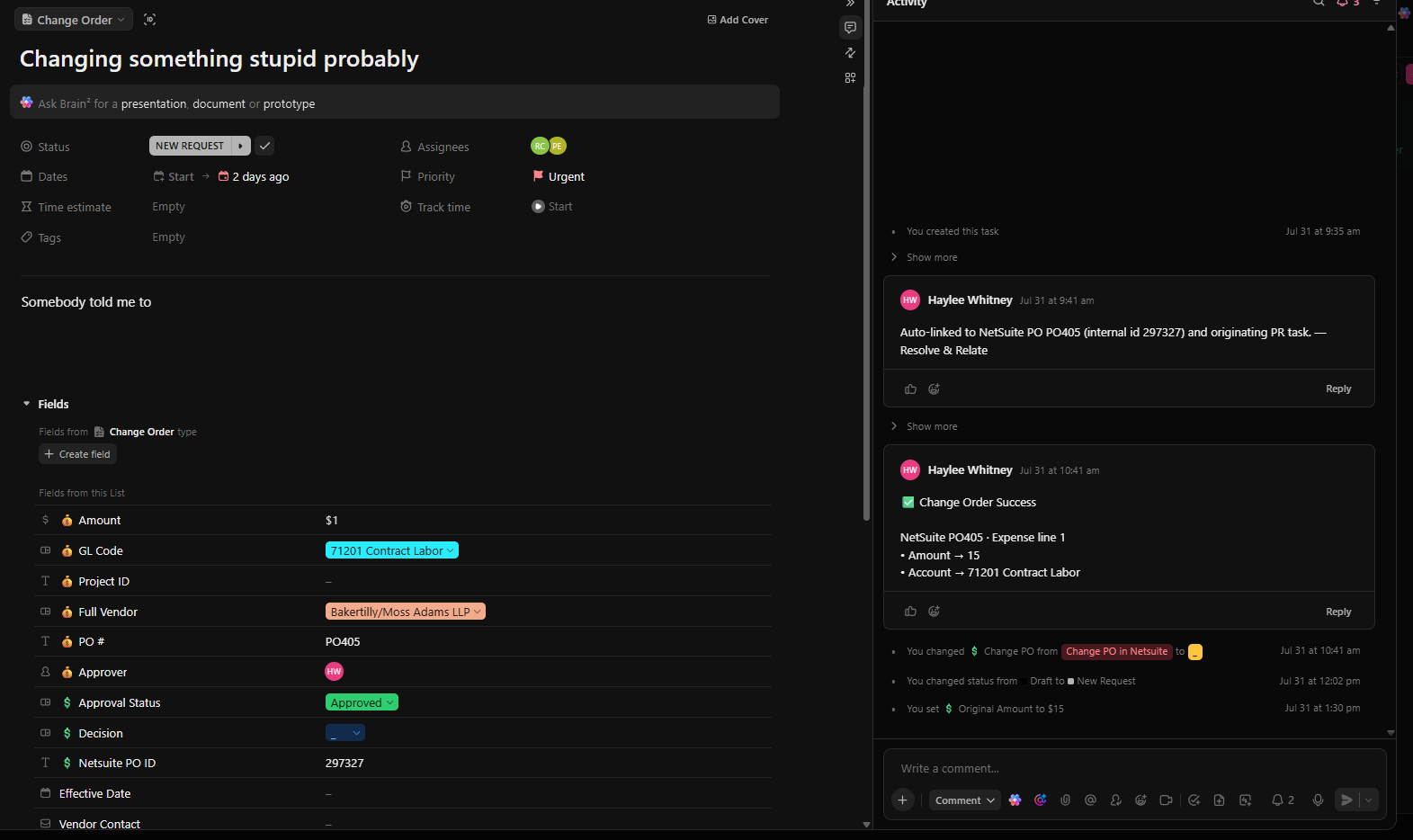
- Verifies by reading the PO back, posts a confirmation comment, and resets Change PO so it can't fire twice.
Purchasing then moves the change order to Completed.
✅ NetSuite PO405 updated — line 1 now reflects the approved change. Verified against the live record.
Result: the real PO in NetSuite reflects the change — with zero manual entry.
¶ E. Error handling — nothing gets lost (behind the scenes)
If anything doesn't line up — a value that doesn't match a NetSuite record, a PO that can't be found — the workflow reports it to the central error log and leaves a note on the change order, so it gets caught and fixed rather than failing silently.
¶ 6. End-to-end walkthrough
- Payton opens a change order and enters the PO #.
- Resolve & Relate finds the PO in NetSuite, links Related PO, stamps Original Amount, and copies Subsidiary / Department / Location.
- Payton enters what's changing and moves it to Purchasing Review.
- Rachelle verifies the values and sets Submit for Approval.
- The tolerance check runs: within tolerance → straight to Approved – Can Update PO; outside tolerance → In Approval Matrix, where the chain is built and each Decision advances it.
- Last approval (or the direct path) lands → status becomes Approved – Can Update PO.
- Rachelle sets Change PO → "Change PO in Netsuite."
- Commit guards, reads the live PO, updates the exact line, verifies, comments, and resets the field.
- Rachelle moves the change order to Completed.
¶ 📸 SCREENSHOT 2 — The "Change PO" field on a task
¶ 📸 SCREENSHOT 3 — The confirmation comment
¶ Status reference
| Status | Meaning |
|---|---|
| New Request | Just opened — Payton associates the PO and enters the change |
| Purchasing Review | With Purchasing to verify the values and Submit for Approval |
| In Approval Matrix | Working through the approval chain (big changes only) — see Approver / Current Step / Approval Progress for who's up |
| Needs Information | Bounced back for more detail |
| Approved – Can Update PO | Fully approved — ready for Purchasing to write the change |
| Rejected | Stopped — the change won't be made (start a new change order if still needed) |
| Completed | The change is live in NetSuite and verified |
The old Manager Review, In Progress, and separate In Approval statuses were collapsed into the single In Approval Matrix status. Which approver is up is now shown by the Current Step / Approver / Approval Progress fields, not by separate statuses.
¶ Safe by design
- A dropdown, not a button. The two-state Change PO field means nothing commits to NetSuite by accident.
- Idempotent. Absolute values, not deltas — if you set it twice, you get the same result, never a double change.
- Guarded, then verified. The workflow re-checks approval and the linked PO before writing, then reads NetSuite back to confirm the change landed.
- Tolerance, not a free pass. Small changes skip the chain, but "small" is a defined band (±10% and ±$10K) measured against the original — anything bigger still gets a full sign-off.
- Approvers are resolved, not chosen. The chain is built from the maintained matrix on the new amount — no one hand-picks who signs off.
- No crosswalk to maintain. Items resolve by NetSuite name and GL codes by account number, straight from the dropdowns.
- Errors never hide. Any problem lands in the central log with a note on the task.
¶ Tips & gotchas
- Vendor change → new PO, not a change order.
- Pick the Item and GL from the dropdowns — they mirror NetSuite names and account numbers, so a picked value will match. Typed-over values are the usual reason a change doesn't resolve.
- Postable GL only. Same rule as purchase requests — the line has to post to a normal, specific expense account.
- Set a Requestor. The manager step in the approval chain is resolved from the requestor. With no requestor, it falls back to a default reviewer instead of the requestor's actual manager.
- One line per PO for now. Multi-line PO edits are a later phase.
- Same dollar amount, or a tiny change? It stays within tolerance and skips the chain — Purchasing applies it directly.
¶ What's next
A few pieces are deliberately scoped for a later phase and aren't live yet:
- Reason for Change — a free-text note so the approver sees why in the requester's own words.
- Multi-line PO edits — today the flow edits one line per PO.
¶ Good to know (current state)
- The flow is built and proven end-to-end on a full, live run — a complete change order travelled New Request → resolve → tolerance → approval matrix → live approvals → Approved – Can Update PO, driven entirely by real clicks and automations.
- The change commit currently runs against the NetSuite sandbox while we finish validation (proven against sandbox PO405). Production cutover is intentionally on hold and hasn't been scheduled.
- Questions, or something looks off? Reach out to Haylee — happy to help!
¶ Technical Appendix — for maintainers
Internal build reference (Haylee / Adam / future maintainers). Not needed for day-to-day use of the flow above.
¶ The five n8n workflows
All live in the personal project and are triggered by ClickUp automations posting to short webhook URLs (https://boxhouseco.app.n8n.cloud/webhook/{path}), with task_id sent in the request body.
| Workflow | ID | Webhook path | Fires when | Does |
|---|---|---|---|---|
| Resolve & Relate | wDVS1Wag2ZNshHWA |
change-order-resolve |
PO # is set | SuiteQL PO lookup → stamps NetSuite PO ID + Original Amount (baseline-guarded, won't overwrite on re-run); copies Subsidiary/Dept/Location from the PR twin by name-match; links Related PO |
| Tolerance Check | YIlkkoxG7s8CpIFz |
change-order-tolerance |
Submit for Approval is set | ±10% AND ±$10K test vs Original Amount → in-tolerance sets status approved - can update po; out-of-tolerance sets in approval matrix |
| Matrix Resolve | CtfeZxGTP8Ucaux7 |
change-order-matrix-resolve |
Status → in approval matrix | Builds chain = Manager → dollar-band approvers, keyed on Subsidiary → Dept → Location → New Amount |
| Matrix Advance | b6SmLaRhDcxQXiYg |
change-order-advance |
Decision changes | Walks the chain; complete → approved - can update po, reject → rejected, needsInfo → needs information |
| Commit | OIIvrC9xPwzBgkCV |
change-order-commit |
Change PO is set | Guards on status, reads live PO, detects item/expense line, resolves GL + item, PATCHes the line (+ header tranDate), verifies, confirms, resets Change PO |
¶ ClickUp automations
Engine (5 webhooks): PO # set → resolve · Submit for Approval set → tolerance · status in approval matrix → matrix-resolve · Decision changes (To = Approve/Reject/Needs Info) → advance · Change PO set → commit.
Stage assigned-comments (7, one per status): new request → Payton · purchasing review → Rachelle · in approval matrix → FYI · needs information → Rachelle + Payton · approved - can update po → Rachelle · rejected → Rachelle + Payton · completed → wrap-up.
⚠️ ClickUp "Call webhook" uses a saved webhook endpoint (the dropdown), not a typed URL. If that saved endpoint points at the wrong path, the automation looks correct but silently misfires. When an automation "isn't working," check the n8n execution history for
mode:webhookvsmode:manualto confirm clicks are actually reaching the workflow.
¶ Approval machinery (shared with the PR path)
The Change Orders list reuses the same custom fields and option IDs as the Purchase Request path, so the PR approval engine ports almost verbatim.
| Field | ID |
|---|---|
| Decision | 0da18e4c-d080-40d0-8403-6b6f897b8f6b (Approve b37aad24…, Reject d3e35222…, Needs Info fce0319d…, _/pending a50cc554…) |
| Approver Chain | 3726cc2c-293d-418e-9495-48500c68c74a |
| Current Step | 943c958e-ed39-40e6-8547-e762eca4df65 |
| Approver | 329db7f6-7a16-48da-bbb7-c53f21d7b7d3 |
| Approval Progress | e940f528-fde4-46e8-b7a8-bce2eb1db145 |
| Requestor | c141e328-28db-47c2-b5e5-71c7aa892f4c |
| Submit for Approval | 764715f0-2227-4226-a2a2-d239375bfd90 |
| Change PO | cfec4eff-85b8-4ca7-b3d1-4ccbb12ce7f8 (commit value "Change PO in Netsuite"; resets to _) |
Matrix data tables: PR_People_Lookup (5qF7kv1Yl0uxmsV4, manager lookup by clickup_id) and PR_Approval_Matrix (PbH8qTAkrY6uifz6, 59 bands). The resolve reuses the PR's orderindex → matrix-name maps for Subsidiary/Department/Location, since the CO shares those dropdown fields.
¶ The commit gate
The Approval Status field was retired. The single commit gate is now the task status approved - can update po — Commit's guard checks status + a present NetSuite PO ID. Both the small-change shortcut and the matrix-complete path land the task there, so it's one consistent gate.
¶ Gotchas learned in the build
- Publish after editing.
update_workflowsaves a draft; the live webhook runs the published version. Always publish after an edit or the change won't be live. - Saved webhook endpoints — see the warning above; the wrong saved endpoint was the root cause of approvals not advancing.
- Read-after-write settle. A short Wait sits at the front of Matrix Advance to let a just-set Decision value settle before it's read. (Belt-and-suspenders; can be removed if it proves unnecessary.)
- Requestor drives the manager step; with none set, the chain falls back to a default reviewer.
- Single line per PO until the PR path's multi-line support lands.
- Sandbox. NetSuite work runs against realm
11056611_SB1; production cutover (swap sandbox → production credential variables) is on hold.