¶ Sourcing Requests in ClickUp — Find and qualify a vendor before you buy
A complete guide to how a sourcing request travels through ClickUp — how you ask Supply Chain to find something, how the search moves across the board, how you stay in the loop while it's worked, and how a recommended vendor either becomes a Purchase Request or stops, with every field and gate along the way.
¶ How it fits with Purchase Requests
Sourcing is the front door. It runs before a purchase — when you know what you need but not who to buy it from, or at what price.
Unlike the Purchase Requests → NetSuite flow, sourcing doesn't create a PO and never touches NetSuite. It's discovery: Supply Chain researches, gathers quotes, and recommends a vendor. From there the request either graduates into a Purchase Request, or it stops here.
The big idea: you describe what you need; Supply Chain does the legwork; a qualified vendor comes back — ready to buy from, or not.
Journey at a glance: Open a sourcing ticket → Manager okays it (Gate 1) → Supply Chain searches → Vendor recommended → Rachelle signs off (Gate 2) → Hand to Payton to start a Purchase Request — or stop here
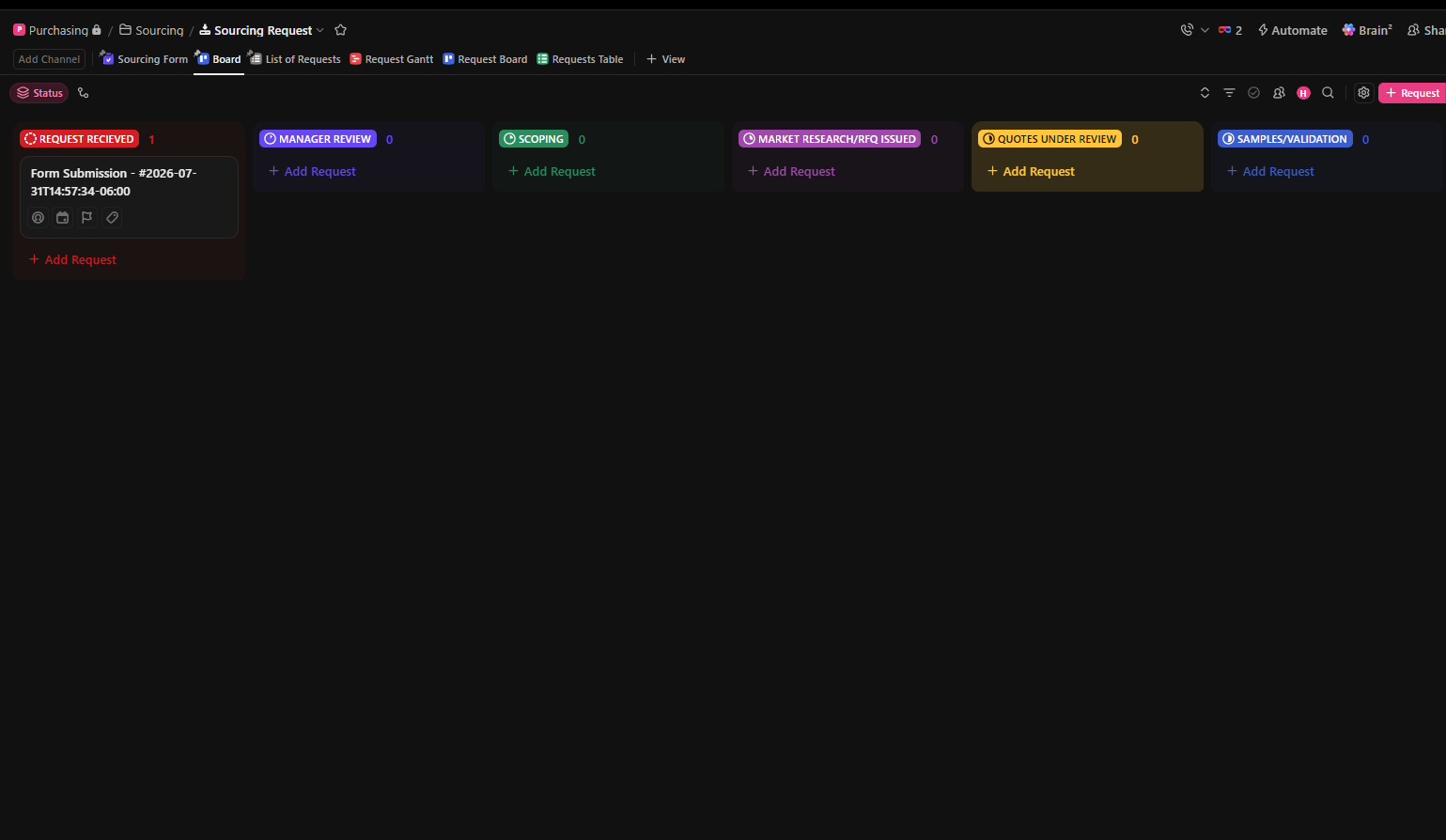
📸 SCREENSHOT 1 — The Sourcing Request board
¶ 1. Where it lives
Sourcing requests live in the Purchasing space → Sourcing folder → Sourcing Request list.
They share the same routing fields as purchase requests (Subsidiary, Department, Location, Requestor), so if a request graduates, its context carries straight into the Purchase Request flow.
The path a sourcing request travels:
Someone opens a ticket → Manager reviews (Gate 1) → Supply Chain searches → Vendor Recommended → Rachelle signs off (Gate 2) → Send to Payton → a Purchase Request begins — or it stops
¶ 2. What sourcing is for
Reach for a Sourcing Request when you know what you need but not who to buy it from. There are four kinds:
| Request Type | Use it when… |
|---|---|
| New component/material sourcing | We've never bought this before and need someone to find suppliers. |
| New vendor qualification (existing item) | We already buy this, but you want a new or second supplier for it. |
| Alternative/substitute evaluation | You want Supply Chain to evaluate a substitute for something we use today. |
| Spec change requiring re-sourcing | A spec changed, so the current source may no longer work. |
Two clean outcomes:
- Graduate — a qualified vendor is found, so the request hands off to start a Purchase Request.
- Stop — the need goes away, nothing suitable is found, or it's parked.
And along the way, if Supply Chain needs more from you, the ticket bounces back rather than stalling.
Sourcing is discovery, not spend. No PO is created here and nothing posts to NetSuite. That happens later, in the Purchase Request flow — only if the sourcing request graduates.
¶ 3. Field reference
In ClickUp each of the fields below shows with a small dollar-sign icon in front of its name — that's just how the list is styled; the names read the same.
¶ Fields you fill in
Who and where
| Field | Type | What it's for |
|---|---|---|
| Requestor | Person | You — the person who needs this. |
| Subsidiary | Dropdown | The BoxHouse entity this is for. |
| Department | Dropdown | Your department. |
| Location | Dropdown | The site or yard it's needed at. |
| Product / Model | Dropdown | The BoxHouse model it supports, or Multiple models / Facility/equipment (non-product) / TBD. |
What kind of request
| Field | Type | What it's for |
|---|---|---|
| Request Type | Dropdown | One of the four types above. |
| Reason for Request | Dropdown | Why now: New product development, Cost reduction, Supply risk / second source, Compliance issue, Quality issue with current vendor, Obsolescence / discontinued part, or Other. |
| Purchasing Method | Dropdown | How you expect to buy it once sourced: Purchase Order, Contract/Service Agreement, Credit Card, or Reimbursement. |
What you actually need
| Field | Type | What it's for |
|---|---|---|
| Explain the Function | Text | In plain language, what the item or service does. The most useful field for the search — give it a sentence or two. |
| Technical Requirements | Text | Dimensions, tolerances, materials, certifications, ratings — whatever a supplier needs to quote accurately. |
| What are we substituting? Have we purchased it before? Is there something we should avoid? | Text | History and landmines. If a vendor didn't work out before, say so here. |
| Drawings / Spec Sheet / Photos | Attachment | Anything visual. A photo or spec sheet speeds up sourcing dramatically. |
| Unit of Measure | Text | each, case, pallet, linear ft, etc. |
| Estimated Annual Usage | Text | Roughly how much we'll use in a year — helps with negotiation. |
Quantity and cost
| Field | Type | What it's for |
|---|---|---|
| Line 1 Quantity | Number | How many for this request. |
| Line 1 Rate | Currency | Your expected per-unit cost (an estimate is fine). |
| Full Amount of Request | Formula | Auto-calculated as Quantity × Rate — don't fill this in. |
Vendor (optional)
| Field | Type | What it's for |
|---|---|---|
| Proposed Vendor | Text | A supplier you already have in mind. Leave blank to let Supply Chain find one. |
| Vendor Contact Name | Text | A contact at that supplier, if you have one. |
Timing and samples
| Field | Type | What it's for |
|---|---|---|
| Needed Production Date | Date | When you need it in hand for production. |
| Samples Needed? | Checkbox | Check if you need to see or test samples before committing. |
| Sample Due Date | Date | If samples are needed, when you'd need them by. |
Anything else
| Field | Type | What it's for |
|---|---|---|
| Notes / Any Extra Details | Text | Anything that didn't fit above. |
You don't need every field to submit — fill in what you know and the sourcing team will follow up on the rest. The request also carries the shared Subsidiary · Department · Location · Requestor context, which travels with it if it graduates into a Purchase Request.
¶ Fields the workflow manages
| Field | Set by | What it's for |
|---|---|---|
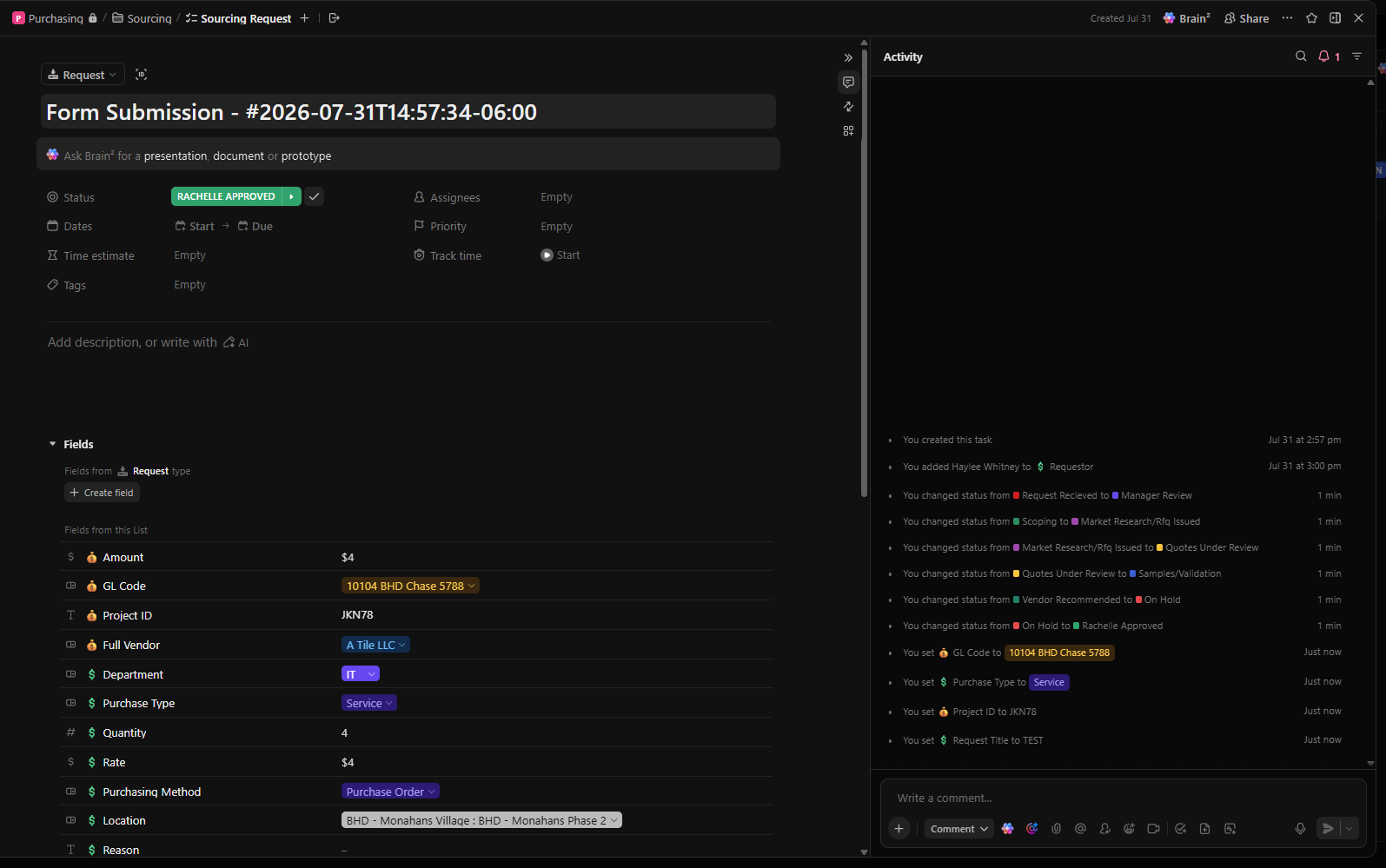
| Full Vendor | Supply Chain | The master vendor dropdown, set once a vendor is identified. Not part of your form. |
| Manager (assignee) | Automation | The requester's manager, assigned automatically for the Gate 1 review. |
| Status | Automation / Team | Where the request is in the search (see status reference). |
¶ 4. The two gates
Sourcing doesn't run the 59-band approval matrix that purchase requests use. It's lighter — approval is a status move at two gates, with the search happening in between.
¶ Gate 1 · Manager — open the search (up front)
When a ticket is opened, the requester's manager is assigned automatically and the request moves to Manager Review. The manager okays it (moves it to Scoping) or sends it back. This is the "yes, go spend Supply Chain's time on this" gate.
¶ The search — Supply Chain does the legwork (the working middle)
Between the gates, the sourcing team works the request across visible statuses:
Scoping → Market Research / RFQ Issued → Quotes Under Review → Samples / Validation → Vendor Recommended.
If something's unclear, the ticket goes On Hold and comes back to the requestor.
¶ Gate 2 · Rachelle — close it out (at the end)
Once the team lands on a vendor (Vendor Recommended), it routes to Rachelle for the final okay (Rachelle Approved). From there it hands to Payton to start a Purchase Request (Send to Payton) — or it stops.
¶ 5. The automations
¶ A. Intake gate — assign the manager (on open)
When a sourcing request is created, an automation assigns the requester's manager (looked up from the central people directory) and sets the request to Manager Review. Result: the right person is asked first, automatically.
¶ B. The search — worked by the team (manual, visible)
The middle of the pipeline is hands-on: Supply Chain moves the request across statuses as it scopes, gathers quotes, and validates. The board keeps everyone seeing exactly where a request stands.
¶ C. Rachelle gate — route for final sign-off (on "Vendor Recommended")
When the request reaches Vendor Recommended, an automation routes it to Rachelle for the closing approval.
¶ D. Handoff — start a Purchase Request (on "Rachelle Approved")
Once approved, the request hands to Payton (Send to Payton) to open a Purchase Request, carrying its context along — or the request stops.
¶ 6. End-to-end walkthrough
- Requester opens a sourcing ticket — describe the item, its function and specs, quantity and rate, timing, and any vendor you have in mind.
- Intake gate assigns the manager and moves it to Manager Review.
- Manager okays it → Scoping.
- Supply Chain works the search: Market Research / RFQ Issued → Quotes Under Review → Samples / Validation → Vendor Recommended. (Questions? It goes On Hold and back to you.)
- Rachelle signs off → Rachelle Approved.
- It hands to Payton (Send to Payton) to start a Purchase Request — or stops.
📸 SCREENSHOT 2 — A recommended vendor, ready for sign-off
¶ 7. After you submit — staying in the loop
Submitting the form is the start of a conversation, not the end of one. You don't drive the statuses, but the team will need you at a few points, and a request most often stalls simply because a question went unanswered.
- You're automatically a watcher on your request. ClickUp emails you (through your normal ClickUp notifications) whenever there's activity.
- Check the task's Comments. This is where Supply Chain asks things like "Can you confirm the tolerance?" or "Is a 4-week lead time okay?" — most often during Scoping.
- Reply on the task, not by side-channel. Keeping the back-and-forth in the comments keeps everyone, and the record, in sync.
- Attach things as they come up. A revised drawing, a spec, or notes on a sample — drop them right on the task.
- Watch the status. If it sits at On Hold, the comments will say what's needed. If it lands on Rejected, they'll say why.
Rule of thumb: if you got an email about your Sourcing Request, open the task and read the latest comment before doing anything else. Nine times out of ten, that's where the action item is.
¶ Status reference
| Status | Meaning |
|---|---|
| Request Received | Just opened |
| Manager Review | Gate 1 — the manager okays the search (action needed) |
| Scoping | Supply Chain is defining the search (they may need answers from you here) |
| Market Research / RFQ Issued | Out looking / RFQs sent |
| Quotes Under Review | Comparing what came back |
| Samples / Validation | Checking samples or validating the fit |
| Vendor Recommended | A vendor is proposed — headed to Gate 2 |
| Rachelle Approved | Gate 2 cleared |
| Send to Payton | Handed off to start a Purchase Request |
| (On Hold / Rejected) | Parked / bounced back, or stopped |
¶ Tips & gotchas
- No PO happens here. Sourcing finds and qualifies a vendor; buying happens later in the Purchase Request flow, only if it graduates.
- Two outcomes: a recommended vendor becomes a Purchase Request, or the request stops.
- Questions bounce back. If Supply Chain needs more, the ticket goes On Hold and returns to you — so keep an eye on your comments.
- Full Amount is automatic. Enter Quantity and Rate; the total calculates itself.
- Context carries forward. Because sourcing shares the Subsidiary / Department / Location / Requestor fields, a graduated request arrives at the Purchase Request flow already filled in.
¶ Good to know (current state)
-
Sourcing is built and staged: the list, the intake form (built with David), the statuses, the shared routing fields, and the n8n advance flow are all in place.
-
Questions, or something looks off? Reach out to Haylee — happy to help!