¶ Working a Sourcing Request — A Guide for the Supply Chain Team
Purchasing › Sourcing › For the Supply Chain team
This is your side of the sourcing flow. The Sourcing Request page tells requesters how to ask for something; this page is about how you work a request once it's in your court — from Scoping all the way to a recommended vendor.
¶ The 30-second version
- A request clears its manager and lands at Scoping — that's your cue.
- You work it across the board, one status at a time: Scoping → Market Research / RFQ Issued → Quotes Under Review → Samples / Validation.
- When you've settled on a supplier, set Full Vendor and move the status to Vendor Recommended.
- That hands it to Rachelle for the closing okay — and you're done.
You never create a PO and you never open NetSuite. Sourcing is discovery; buying happens later, only if the request graduates into a Purchase Request.
¶ Where your work lives
Purchasing space → Sourcing folder → Sourcing Request list.
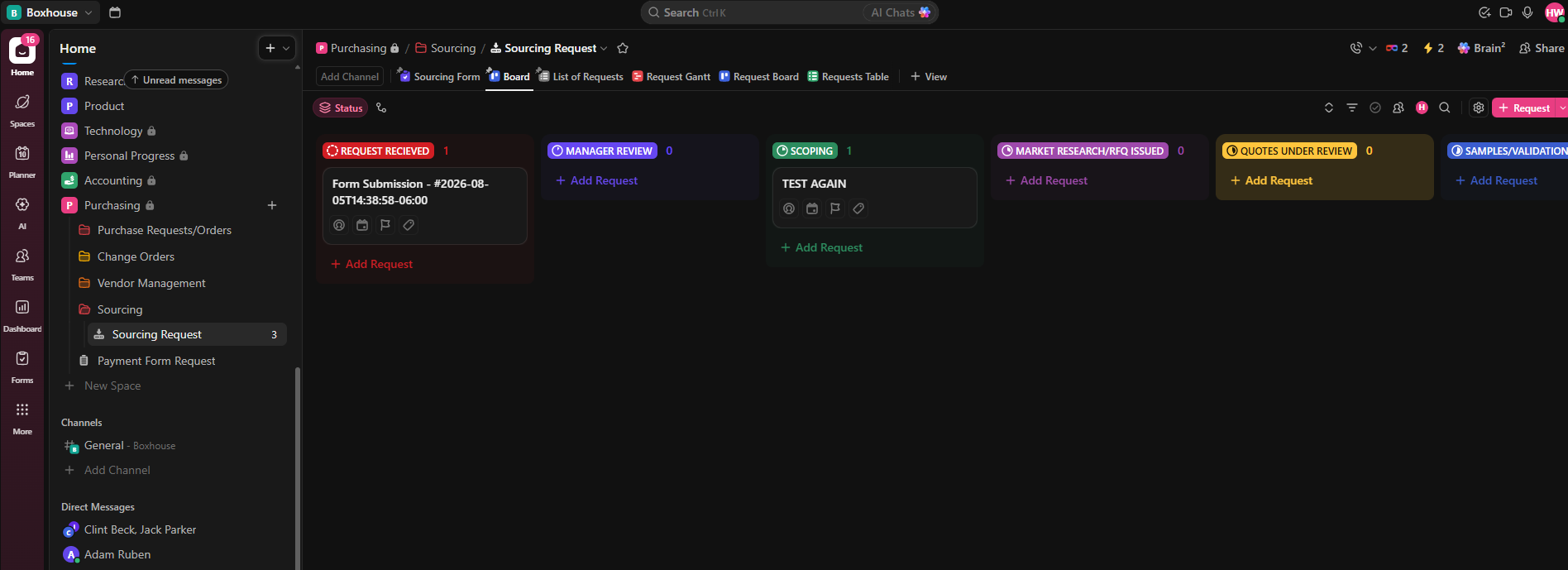
The middle of the pipeline — everything between the two gates — is yours to drive. Unlike the two gates (which auto-assign the manager, then Rachelle), the search statuses aren't assigned to one specific person: the team works the board. Keep the Sourcing Request list, or your own view of it, handy so nothing sits unseen.
📸 SCREENSHOT 1 — The Sourcing Request board
¶ How a request reaches you
Gate 1 has already happened before you pick it up. When the ticket was opened, the requester's manager was auto-assigned and the request sat at Manager Review. Once the manager okays it, the status moves to Scoping — and that's your green light.
If a request is at Scoping, it's ready to be worked.
¶ Read the request first
Before you start searching, open the ticket and read what the requester gave you. The fields that matter most for the search:
- Explain the Function — plain-language "what it does." Usually your best starting point.
- Technical Requirements — dimensions, tolerances, materials, certs, ratings. What a supplier needs to quote accurately.
- What are we substituting / bought before / avoid — history and landmines. If a vendor didn't work out last time, it's here.
- Drawings / Spec Sheet / Photos — anything visual speeds you up a lot.
- Request Type + Reason for Request — tells you whether you're finding a brand-new supplier, a second source, a substitute, or re-sourcing after a spec change.
- Estimated Annual Usage + Unit of Measure — your leverage for negotiation.
- Needed Production Date / Samples Needed? — your timing constraints.
If something critical is missing or unclear, don't guess — see On Hold below.
¶ Working the board — status by status
Move the ticket forward as the work actually progresses. Each status tells everyone — including the requester, who's watching — exactly where things stand.
| Status | What you're doing | Advance when |
|---|---|---|
| Scoping | Defining the search — pinning down specs, confirming details with the requester. | You know what you're looking for and who to ask. |
| Market Research / RFQ Issued | Finding candidate suppliers; sending RFQs. | RFQs are out / the research pass is done. |
| Quotes Under Review | Comparing what came back — price, lead time, terms, fit. | You have a leading candidate. |
| Samples / Validation | Checking samples or validating the fit. (Skip if no samples are needed.) | The vendor checks out. |
| Vendor Recommended | Recording the vendor and handing to Gate 2. | (see "Landing on a vendor" below) |
¶ When you need something from the requester
If you hit a question you can't answer yourself — a tolerance to confirm, an okay on a longer lead time — move the ticket to On Hold and leave a comment saying exactly what you need. The requester is a watcher and gets pinged automatically. When they answer, pick it back up where you left off.
💡 Keep the back-and-forth in the task comments, not email or chat — it keeps the record and everyone in sync, and it's the first place anyone looks when a ticket stalls.
¶ Landing on a vendor
When you've settled on a supplier:
- Set the Full Vendor field (the master vendor dropdown) to the vendor you're recommending.
- Move the status to Vendor Recommended.
That status move routes the request to Rachelle for the closing sign-off (Gate 2) — automatically. You don't assign her by hand, and your part is done.
After Rachelle approves, the request hands to Payton (Send to Payton) to open a Purchase Request, carrying all its context — Subsidiary, Department, Location, Requestor — forward. Or it stops here. Neither of those is your step.
¶ What not to do
- Don't skip ahead to Send to Payton. That comes after Rachelle's okay — moving there yourself jumps the gate.
- Don't create a PO or open NetSuite. No spend happens in sourcing. If a vendor graduates, the Purchase Request flow handles the buying.
- Don't let a ticket sit silently. If you're waiting on someone, On Hold + a comment keeps it honestly visible instead of looking stalled at a working status.
¶ Status glossary
| Status | What it means for you |
|---|---|
| Request Received | Just opened; not yet okayed. |
| Manager Review | Gate 1 — waiting on the requester's manager. Not yours yet. |
| Scoping | Yours now — define the search. |
| Market Research / RFQ Issued | Out looking / RFQs sent. |
| Quotes Under Review | Comparing what came back. |
| Samples / Validation | Checking samples or validating the fit. |
| Vendor Recommended | You've proposed a vendor — routed to Rachelle. |
| Rachelle Approved | Gate 2 cleared. |
| Send to Payton | Handed off to start a Purchase Request. |
| On Hold / Rejected | Parked and back with the requester, or stopped. |
¶ Questions?
- A status won't advance, or something looks broken → contact Haylee Whitney (haylee@boxhouse.com).
- A question about a specific vendor, quote, or the Purchase Request handoff → Rachelle.
¶ Good to know (current state)
- Sourcing is built and staged — the list, the intake form, the statuses, the shared routing fields, and the n8n advance flow are all in place.
- No PO or NetSuite step lives in this flow. Buying happens later in the Purchase Request flow, and only if a request graduates.
- Questions, or something looks off? Reach out to Haylee — happy to help!